What Is e-Punjab?
“e-Punjab” is not a single official app or website – it is the informal, commonly used name for the Punjab government’s wider push to move citizen services online, most of it built and run by the Punjab Information Technology Board (PITB). Under this umbrella sit several separate, distinctly named services, including ePay Punjab (online bill and tax payment), MTMIS Punjab (vehicle registration and verification), and the Punjab Portal (punjab.gov.pk, the government’s main citizen information site). Each has its own website and purpose, so it helps to know which one you actually need.
This guide focuses on ePay Punjab specifically, since that is the service most people mean when they ask how to pay a bill through e-Punjab. ePay Punjab is the app and website built by PITB that lets people pay taxes, traffic fines, and other government bills online. You do not need to go to any office or wait in long lines.
Just enter your details, and the app gives you a special 17-digit number called PSID. You can use this number to pay through your bank, mobile wallet, or ATM. It is easy, fast, and safe for everyone to use.
Last Verified: 8 August 2026 – service names, payment channels, and links on this page were checked against PITB’s official ePay Punjab documentation. Please verify the latest details on the official ePay Punjab app or website, as services can change.
Step-by-step guide to using e-pay Punjab
1. Register or log in
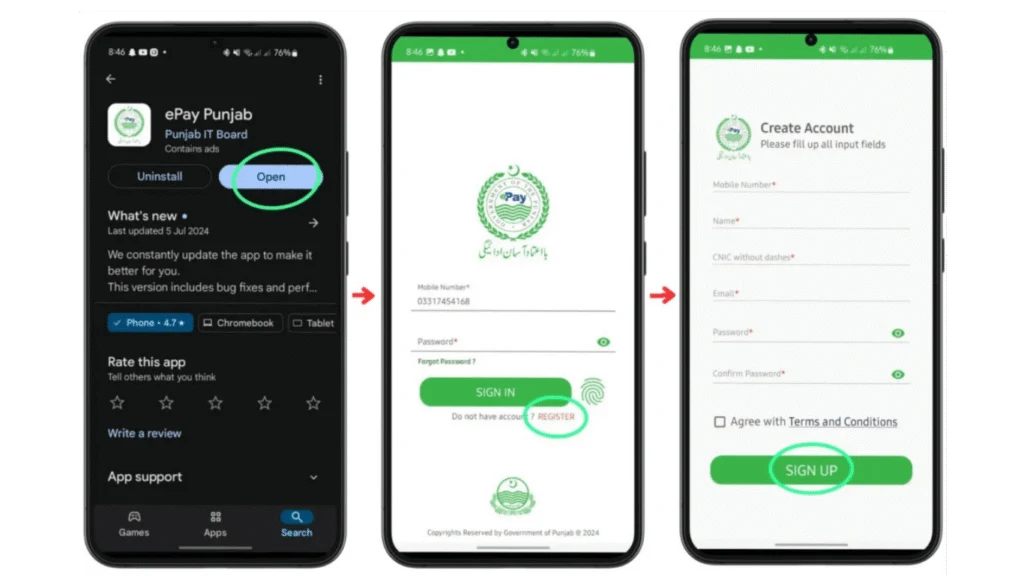
Visit the official e-Pay Punjab portal or open the mobile app.
Click register, fill in your CNIC, mobile number, email, and set a password.
Verify your account using the OTP sent to your email or phone.
If you already have an account, click Login and enter your credentials.
2. Select the Relevant Service
After logging in, choose a department like Excise & Taxation, Board of Revenue, or Punjab Police
Select the specific service you want to pay for, like token tax, traffic challan, or property tax.
3. Enter your details.
For vehicle-related services, enter your vehicle registration number.
For property tax or other services, input the PSID or PIN number.
The system will fetch relevant information like your pending amount.
4. Generate the Challan
Review the displayed details to ensure accuracy.
Click on Generate Challan
The system issues a unique 17-digit PSID (Payment Slip ID) for that transaction.
5. Choose a payment channel.
You can pay using the generated PSID via multiple options
Mobile banking (via your bank’s app)
Internet banking (bank portal)
ATMs (1-link enabled)
Over the counter (OTC) at bank branches
Mobile Wallets (JazzCash, EasyPaisa)
Telco Agent Outlets
6. Complete the Payment
Enter the PSID in the selected channel.
Confirm the amount and authorize the transaction.
Wait for the transaction to process; this may take a few moments.
7. Receive Confirmation & Receipt
Once the payment is complete, you will receive a confirmation message.
An electronic receipt is generated, visible on the portal/app, and may also be sent via SMS or email.
8. Track and Save Records
You can view past transactions and download receipts within the portal or app.
This ensures traceability and helps maintain a digital record of all payments.
Benefits of Using e-pay Punjab
Easy to use
You don’t need to stand in long lines or fill out forms. Just use the app or website and pay from anywhere.
2. Saves time
You can pay your taxes and challans in minutes. No need to visit government offices.
3. Available 24/7
e-pay Punjab works day and night. You can use it anytime, even on weekends.
4. Safe and secure
Your payment is protected. Every transaction is tracked with a unique number (PSID), so nothing gets lost.
5. Many ways to pay
Use ATM, mobile banking, internet banking, EasyPaisa, JazzCash, or whatever works best for you
6. Helps you Stay Organized
All your payments are saved in one place. You can check your history anytime
Mobile App vs Web Portal Comparison
| Feature | 📱 Mobile App | 🌐 Web Portal |
| Ease of Use | Very easy to use on your phone | Straightforward on a desktop or mobile browser |
| Access | Anywhere, anytime from your mobile | Need internet and browser (Chrome, etc.) |
| Download Required | Yes (from Google Play Store) | No download needed |
| Speed | Fast and convenient | Also fast but better on big screens |
| Best For | On-the-go payments | Detailed tasks and printing receipts |
| Notifications | Sends push alerts/reminders | No push notifications |
| Login | Log in every time you visit | Login every time you visit |
Frequently Asked Questions
Is e-Punjab the same as ePay Punjab?
Not exactly. e-Punjab is an informal umbrella term for Punjab’s online government services in general, while ePay Punjab is one specific service under that umbrella, focused on paying government bills, taxes, and fines online.
What services can I pay for using ePay Punjab?
You can pay vehicle token tax, e-challans, property tax, registration fees, route permits, e-stamps, and more, all online through the app or website.
How do I download my payment receipt?
After payment, enter your PSID on the ePay Punjab website or app. You will see the status and can download the receipt instantly in PDF format.
What are motor vehicle registration charges?
These are official government fees paid when you register a new car or motorcycle. You can pay them easily through ePay Punjab.
Is MTMIS Punjab part of ePay Punjab?
No, they are separate PITB-built services. MTMIS Punjab is for vehicle registration verification and status checks, while ePay Punjab is specifically for paying bills and taxes. You may use both together, for example checking a vehicle on MTMIS and then paying its token tax through ePay Punjab.
Is there a fee to use ePay Punjab?
ePay Punjab itself does not charge an extra service fee for most payments, though your bank or mobile wallet provider may apply its own standard transaction charges depending on the payment channel used.
Related Guides
You may also find these guides useful: Token Tax Punjab, Vehicle Smart Card Status, Punjab Number Plate Check, Bike Verification, Punjab Vehicle Transfer Fee 2026, MTMIS Lahore, Imported Vehicle Verification, and CM Punjab E-Bike Scheme 2026.
Visit our homepage for more MTMIS Punjab guides, learn more About Us, or Contact Us if you have questions.
Editorial Note
Last Verified: 8 August 2026
Fact Checked: Yes – service names, payment channels, and the distinction between e-Punjab, ePay Punjab, and MTMIS Punjab on this page were checked against PITB’s official documentation.
Editorial Note: MTMIS Punjab is an independent, unofficial information resource and is not affiliated with the Government of Punjab, PITB, or the Excise and Taxation Department. This guide is reviewed periodically and updated whenever PITB changes ePay Punjab’s process, portal, or supported services. Please verify the latest details on the official ePay Punjab app or website.
Official References: Punjab Information Technology Board (pitb.gov.pk) – developer and operator of ePay Punjab and MTMIS Punjab. ePay Punjab official portal (epay.punjab.gov.pk). Punjab Portal (punjab.gov.pk) – the Government of Punjab’s main citizen information site.